



环境变量
| 影响 | 说明 |
|---|---|
KARMA_XPU_DISABLE_OPTIX_DEVICE = 1 | Karma XPU 不会使用任何 Optix GPU 设备 |
KARMA_XPU_DISABLE_EMBREE_DEVICE = 1 | Karma XPU 不会使用 Embree CPU 设备 |
KARMA_XPU_DISABLE_DEVICE_n = 1 | Karma XPU 不会使用设备编号 n。例如,在多GPU设置中禁用设备3:导出KARMA_XPU_DISABLE_DEVICE_3 = 1 |
| HOUDINI_TEXTURE_DISK_CACHE | 设置纹理缓存位置。“dir=D:/Temp/houdini_rat” |
| KARMA_XPU_OPTIX_HQ_LINEAR_FILTERING | 默认关闭。强制 Karma XPU Optix 设备执行高质量线性过滤(这将带来性能损失) |
| KARMA_XPU_OPTIX_FORCE_CONSTANT_FOLDING | 默认关闭。这会强制XPU将参数值硬编码到着色器代码中。它可以提升渲染性能约20%,但着色器编译会更频繁且耗时更长。 |
| KARMA_XPU_OPTIX_CURVE_OPT_LEVEL | 默认自动(0)。KarmaXPU 中 Optix 曲线的优化级别。越高越快,但也会占用更多内存。低 = 1,中 = 2,高 = 3 |
阴影通道
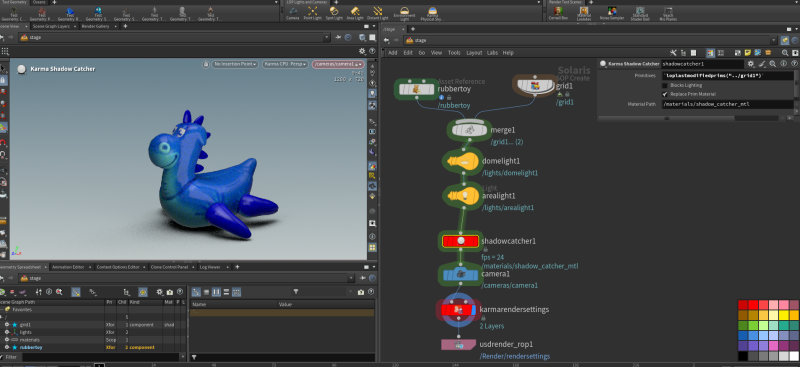
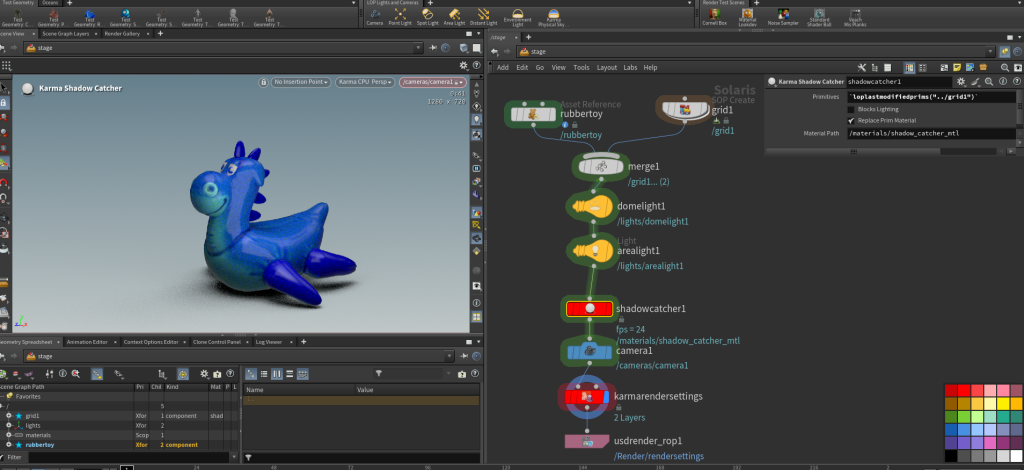
shadowcatcher阴影捕捉
![图片[1]-karma-houdiniUE](http://www.houdiue.cn/wp-content/uploads/2025/11/image-3-1024x470.png)
![图片[2]-karma-houdiniUE](http://www.houdiue.cn/wp-content/uploads/2025/11/image-4-1024x398.png)
shadowcatcher的primitives用来输入需要捕捉阴影的平面。开启后该平面会临时在视图中不可见了。
![图片[3]-karma-houdiniUE](http://www.houdiue.cn/wp-content/uploads/2025/11/image-5-1024x347.png)
需要在karma 渲染设置-image output- shadow catcher- Add houdout to beauty添加阴影捕捉通道。
![图片[4]-karma-houdiniUE](http://www.houdiue.cn/wp-content/uploads/2025/11/image-6-1024x403.png)
在通道切换按钮处可以看到holdout_shadow的阴影捕捉通道。然后就可以在karma aov多通道中添加该输出通道了。
![图片[5]-karma-houdiniUE](http://www.houdiue.cn/wp-content/uploads/2025/11/image-7-1024x509.png)
karma相机对焦指定物体及多物体之间变焦 vex
![图片[6]-karma-houdiniUE](http://www.houdiue.cn/wp-content/uploads/2025/11/image-1024x524.png)
红色物体a,蓝色物体b,黄色物体c
mix值为1,对焦物体为c。为0时对焦物体a。在0-1之间时,对焦在a,c之间变化,通过对mix的控制实现物体之间的对焦变化。
![图片[7]-karma-houdiniUE](http://www.houdiue.cn/wp-content/uploads/2025/11/image-1-1024x468.png)
![图片[8]-karma-houdiniUE](http://www.houdiue.cn/wp-content/uploads/2025/11/image-2-1024x454.png)
运动模糊
![图片[9]-karma-houdiniUE](http://www.houdiue.cn/wp-content/uploads/2025/11/image-8.png)
在karma渲染设置中开启motion blur,只能捕捉物体运动的模糊。
但是,相机本身的运动模糊需要motion blur节点。此时,当物体运动方向和相机运动方向一致时,运动模糊比较小。反之,运动模糊比较大。
![图片[10]-karma-houdiniUE](http://www.houdiue.cn/wp-content/uploads/2025/11/image-11-1024x800.png)
可以在渲染设置-image output- AOV-Utility-Motion Vectors中打开输出运动模糊通道(两种运动模糊的叠加),视口通道按钮中就会由motionvectors通道的选择了。
rendering Pyro
- 用Pyro Postprocess SOP SOP节点将Vel体积按密度剔除,缓存卷时能节省大量磁盘空间(和性能)!在信息面板里监控体积原件大小,你会发现Vel体积可能比密度大好几倍。大多数时候我也会把VDB转换成16位,所有这些选项都在那个节点里。Use the Pyro Postprocess SOP node to cull the Vel volume by the Density, it saves a humongous amount of disk space (and performance) when caching volumes! Monitor the volume primitive sizes in info panel and you’ll see that the Vel volume can be many folds bigger than the Density. Most of the time I also convert VDBs into 16 bit, all these options are present in that node.
- 导入这些体积图到Solaris时,务必明确限制体积LOP到你真正需要节省(大量)显存的体积原件。有一个字段可以指定原语。如果你渲染时没有运动模糊,可能根本不需要Vel体积。When importing those volumetrics into Solaris always limit the Volume LOP explicitly to the volume primitives you really need to save (a lot of) VRAM. There is a field where you can specify the primitives. You might not need the Vel volume at all if you render with no motion blur.
- 美元缓存所有东西,这将让你在#业力标签中的第一次像素时间几乎归零!尤其是当你开启了“用单进程渲染”选项时(Karma会在渲染前缓存整个场景,过程可能相当长)USD cache all the things, this will bring your First Pixel time in hashtag#Karma to nearly zero! Especially when you have the “Render with single process” option on (then Karma caches the entire scene prior the rendering, and it can take pretty long)
- 我在 Houdini 里音量更新正常,但在外部渲染器里卡住时,遇到了奇怪的美元时间采样现象。一个快速的变通方法是用USD缓存。USD 卷缓存非常紧凑,因为它不包含实际的 VDB,只是引用它们。I encountered a strange USD time sampling behavior when the volume was updating fine while inside Houdini but was frozen in the external renderer. A quick workaround is to USD cache it too. USD volume cache is very compact, since it does not contain the actual VDBs, but simply references them instead.
付费阅读
© 版权声明
文章版权归作者所有,未经允许请勿转载。
THE END



暂无评论内容